
|
See the title.
This question is marked "community wiki".
|


|
If you're printing from a terminal (e.g. over ssh), type
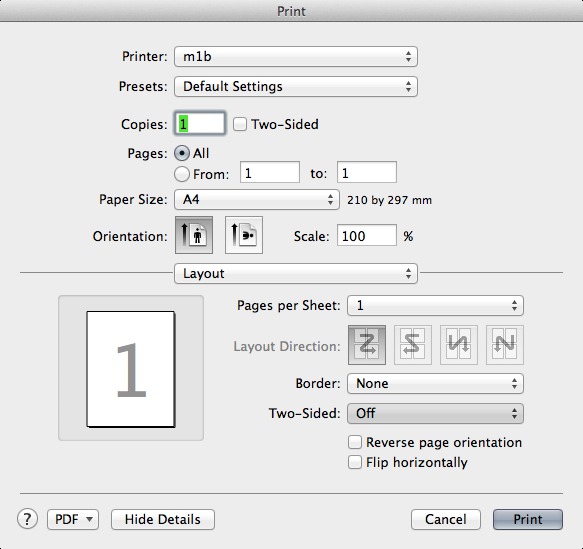
Here If you're printing using a graphical interface (press Print in Firefox or Evince or whatever application you might use), if you have correctly configured your printer settings, there should be an option for printing two-sided. For instance, in Mac OS X Lion (press "Show Details" if you don't see everything):
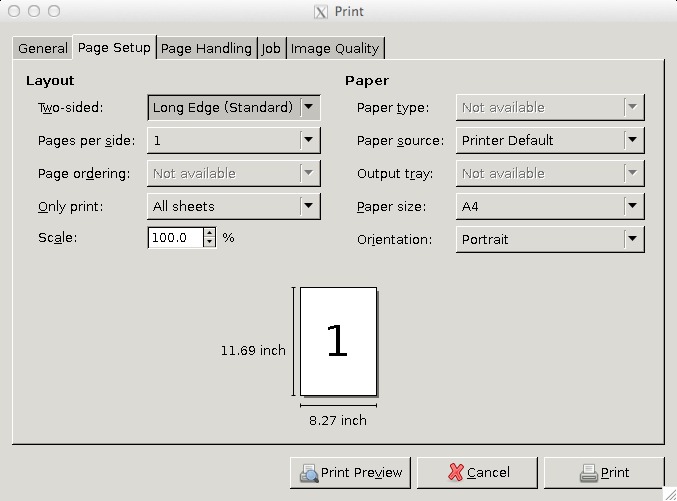
And in a GTK-environment:
If these options are not available, either you have misconfigured your printer setup, the printer is not available or the printer is not able to print duplex. To correctly set up your printer check: http://qa.dikutal.dk/questions/28/how-do-i-print-from-my-mac-os-x-laptop-when-at-diku or http://qa.dikutal.dk/questions/27/how-do-i-print-from-my-linux-laptop-when-at-diku Currently the linux one is empty, but setup should be very similar to how it's done in OSX (most linux use the same printer system cups). |


Maybe add double-sided in parenthesis (or something like that) after duplex in question title? It seems to me that if you already know that it's called duplex, you probably know how to print duplex.
I think that you should be able to do such an edit yourself, as I've marked my question a "community wiki", or am I wrong? Would you mind doing that test?